We are excited to bring you important updates on the latest features for Coach, following our most recent release.
Coach platform spring updates
What’s new in Coach Platform:
1. Parent letter available in multiple languages
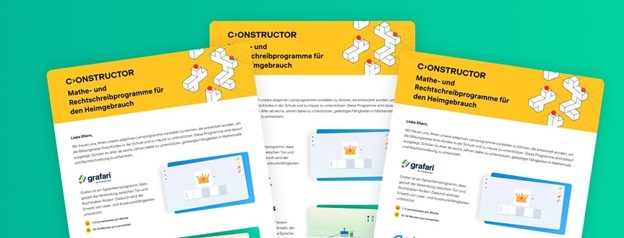
The Parent Letter can now be accessed in English, German, French, Swedish, Dutch, Italian, Ukrainian, and Turkish. We want to ensure that families from diverse linguistic backgrounds are informed about the applications their children are using. If you feel we should add another language to the Parent Letter, please let us know.
2. Instant modules for Grafari Orthograph
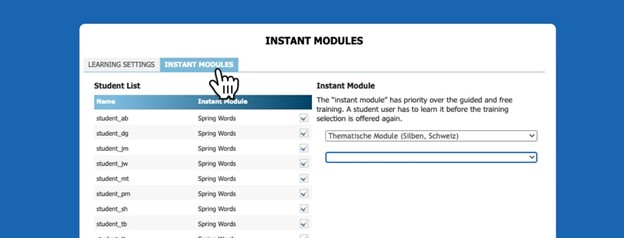
You can now add instant modules via the Orthograph Module Editor in the Cockpit. Once added, the module will appear for learners immediately after their next login. This is designed to help learners train on specific word sets aligned with your school’s curriculum or address their individual learning challenges.
3. Customizable learning plans for Grafari Orthograph
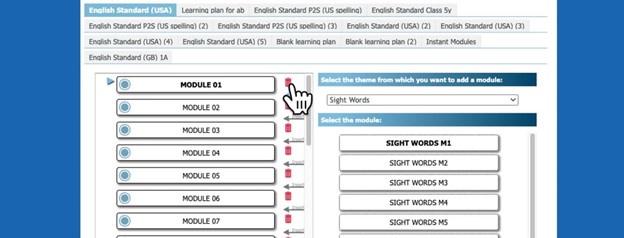
This feature allows you to modify a learner’s plan within the Orthograph Module Editor in the Cockpit. You can select individual learners, remove modules, and fully personalize their training experience.
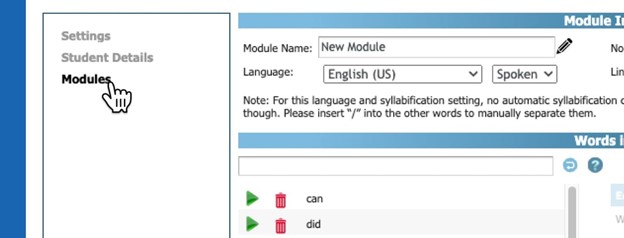
4. Editing modules in Orthograph Module Editor
he Orthograph Module Editor now enables you to open, customize, and even create new learning modules. This flexibility helps you create tailored learning paths for your entire class or individual students.
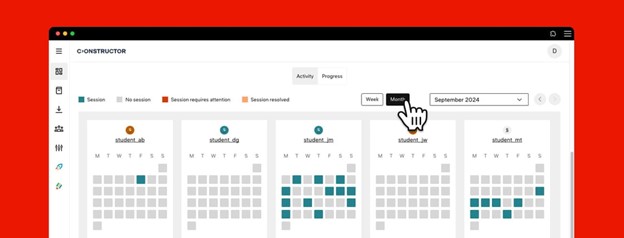
5. Monthly view in the Learning board
This new feature provides an overview of your class’s training activity over a one-month period. You can select any month and view the learning sessions conducted by your class.
What's new in Institution management (admin features):
1. Overview tab
The new Overview tab offers essential insights into your school’s activity, including license usage, number of users, and the distribution of assigned and unassigned licenses for every learning application.
2. Content licenses tab
Manage your school’s licenses efficiently with this new feature. You can view the number of active licenses allocated to your school and assign them to students either individually or in bulk.
Coming soon…
1. Enhanced administrative functionalities
In the coming months, we’ll add new administrative features to the Coach platform. Teachers will be able to create their own profiles and groups.
2. In-app Coach feedback form
We will be introducing an in-app feedback form so you can easily provide feedback on Coach or our learning applications. You’ll also be able to book an interview with our product team to share your thoughts.
3. Improved reports and certificates
We’re working on improving the reporting and certification features, enabling teachers to track and share student progress with families, while offering an overview of progress made over a set period.