Constructor Practice: October 31, 2025

31 October, 2025

Overview

In this release, we introduce semi-automated grading for Science Labs in Learn. The feature reduces grading time by combining automatic scoring for objective questions with flexible manual review for open-ended responses. Teachers retain full control over final scores and feedback, grading remains fully integrated into existing Learn workflows, and grading time can be reduced by up to 50%.

What's New?

Centralized grading access

Teachers can now access grading directly in Learn through:

  • Assessment page – overview of submitted activities awaiting review.
  • Gradebook – grading by selecting submissions per experiment or activity.

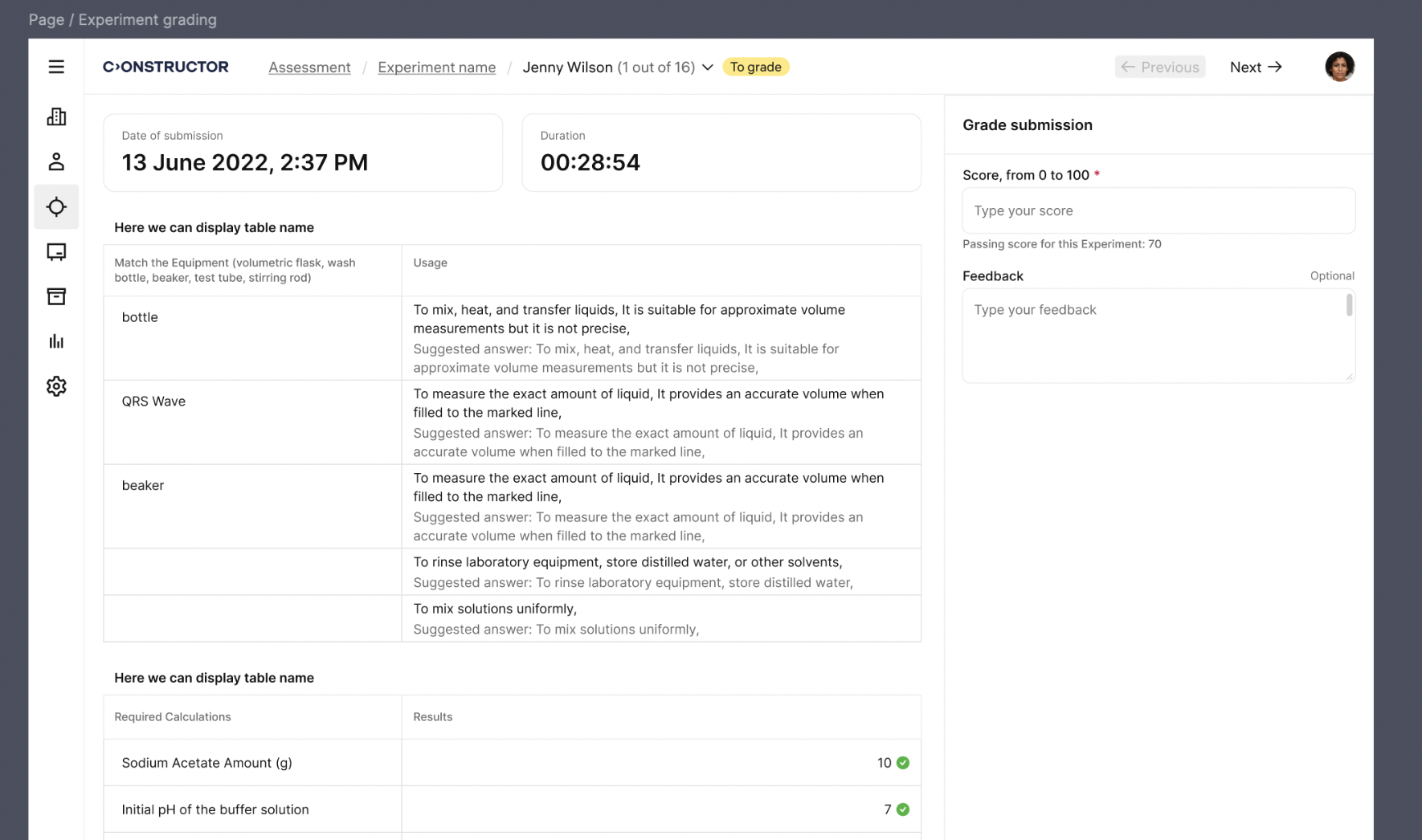
Double-clicking a learner's name opens the grading mode for teachers. Breadcrumbs show the full navigation path.

Simplified submission navigation

Grading multiple submissions is now faster and more intuitive:

  • Next and Previous arrows enable quick navigation between learners.
  • The system automatically skips already graded submissions.
  • Once all submissions are graded, navigation is disabled.

This enables teachers to grade entire classes with the minimal number of clicks and interruptions.

Auto-grading for questions with preset answers

For experiment tasks with preset answers (for example, numerical tables):

  • Learner answers are compared with correct solutions
  • Scores are calculated for each question
  • A suggested overall grade is generated

Teachers can review auto-graded results before finalizing grades.
Manual grading and full override control

Open-ended questions are graded manually. For such questions:

  • Learner responses are shown unchanged.
  • Recommended answers appear for reference.
  • Teachers determine correctness and scoring.
  • Teachers can override auto-graded results at any time.

Flexible scoring and grade recording

Teachers assign the final score:

  • Scoring range: 0–100.
  • Results are shown in points and percentage.
  • Grades are automatically stored and synchronized on the Gradebook and Assessment pages.

This ensures consistent and reliable grade visibility in Learn.

Built-in commenting and feedback

Teachers can provide feedback directly in the grading workflow:

  • Comments can be added at the task level.
  • Comments can be added at the submission level.
  • Comments are saved with the submission.
  • Learners can review feedback together with graded results.

This supports clearer communication between teachers and learners.