Secure Browser: your essential tool for exam integrity
16 July, 2025


Think back to the last online exam you took or administered. Did you feel completely confident that every result was accurate and fair? With remote assessments becoming more common, the challenge is to make sure tests remain reliable, secure, and convenient, no matter the location. Tools that provide enhanced security, prevent cheating, and ensure accurate results have become indispensable.
Imagine a virtual exam hall, meticulously monitored, yet comfortably accessible from anywhere.
Constructor Secure Browser acts exactly like that - providing an environment for online tests that restricts unauthorized activities and ensures that every exam truly reflects the candidate's knowledge.
Secure Browser works with Constructor Proctor, Assess and Learn and can be easily integrated with LMS platforms like Canvas and Blackboard through LTI. Once set up, it enforces strict rules during exams, blocking all distractions and potential cheating pathways, with or without video recording.
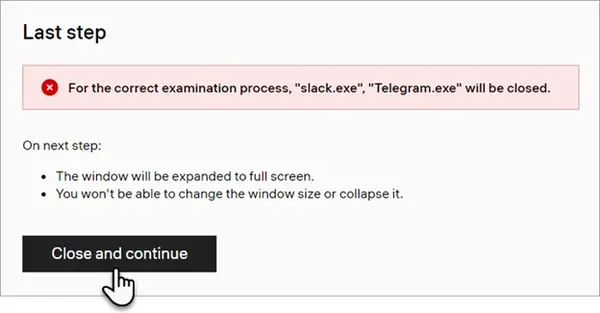
Kiosk mode & forced full screen: Locks the exam into full-screen mode, preventing any attempts to minimize, switch apps, or multitask.
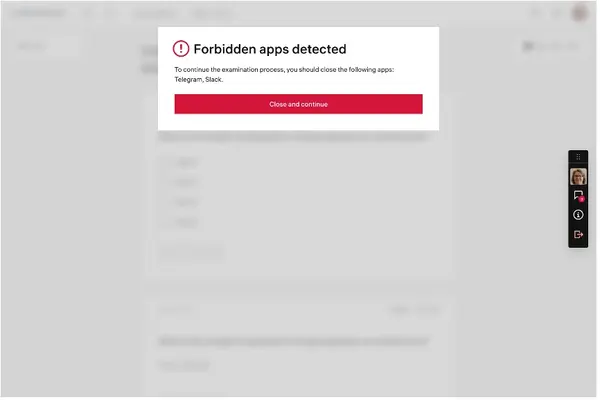
Blocking forbidden applications: Detects and blocks unauthorized apps, browsers, and screen-capture tools.
Multiple display prevention: Detects and blocks additional screens or mirroring software until disconnected.
Browser enforcement: Ensures users can't open unauthorized browser windows or tabs during the exam.
Virtual machine detection: Identifies if the exam is being accessed through virtual machines, maintaining assessment integrity.
USB device detection: Detects any unauthorized connected USB devices, preventing external device usage during exams.
Hotkey and right-click menu blocking: Disables hotkeys and right-click menu options, eliminating shortcuts or quick actions.
Mouse focus detection: Monitors mouse activity to ensure continuous engagement with the exam window.
Browser DevTools disabled: Prevents users from opening browser developer tools.
Tab blocking: Prevents the opening of new tabs during exams.
Native proctoring tool support: Integrates with native proctoring tools for additional monitoring.
White labeling options: Allows institutions to customize branding, creating a user experience.
Accessibility standards: Compliant with accessibility standards, ensuring inclusivity for all learners.
Customizable security levels: Offers multiple proctoring options - from live supervision to recorded sessions reviewed afterward. Learn about various proctoring modes.
Integration and compatibility: Easily integrates with LMS platforms, supported by comprehensive guides and intuitive API parameters.
Constructor Secure Browser installation is straightforward on both Windows and macOS. Learners simply download, install, and launch the browser directly for their proctored sessions.
Clear step-by-step instructions ensure smooth deployment, minimizing technical support overhead.
Interested in learning how Constructor Secure Browser can transform your institution's assessment integrity? Explore these resources for further reading:
Constructor Secure Browser isn’t just about technology - it’s about trust. Ready to take the next step? Visit our blog for more insights or contact us directly to see it in action.