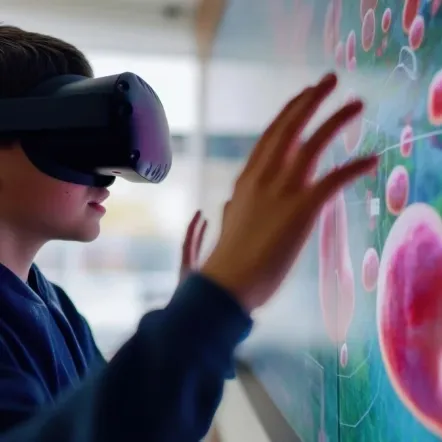
Virtual reality in the classroom: a school & university guide
01 July, 2026


VR in the classroom is most useful when it solves a clear learning problem. Schools and universities use it to make abstract concepts easier to explore, expand access to labs, support safer practice, and give students experiences that are difficult to provide in a traditional room. The goal is not to make lessons more impressive; it is to improve access, engagement, and understanding without adding unnecessary operational complexity.
Virtual reality in the classroom uses immersive digital environments to help students explore places, processes, simulations, or practical tasks that are difficult to experience physically. Learners may use headsets, 3D simulations, or interactive tools to practice skills, observe systems, and engage with content in a more active way.
Traditional teaching often relies on explanation, textbooks, slides, videos, demonstrations, and physical classroom activities. VR adds an immersive layer where students can move through an environment, manipulate objects, observe cause and effect, and repeat experiences safely. This can be useful when the subject is spatial, procedural, dangerous, expensive, or hard to visualize.
A virtual reality classroom should still be guided by teaching goals. It is not enough to place students inside a simulation and hope learning happens. Teachers need a clear task, a reason for using VR, and a way to connect the experience back to discussion, assessment, or practical work.
Most classroom VR setups include headsets, interactive simulations, content libraries, device management, and teacher controls. Some schools use fully immersive headsets, while others use desktop or tablet-based 3D environments when hardware access is limited. The right setup depends on age group, subject, budget, accessibility needs, and IT capacity.
When evaluating VR solutions for schools, start with the learning workflow rather than the hardware. Ask what students will do, how teachers will guide the session, and how progress will be reviewed afterward. The platform should fit the classroom, not force the classroom to fit the device.
Virtual reality for schools and universities is growing because some learning experiences are difficult to provide consistently through physical resources alone. This is especially true in science, health, engineering, geography, history, and career-based training. Used well, VR can support engagement, access, safety, and skills practice.
Students often engage more deeply when they can explore a concept rather than only hear about it. VR can help them see scale, movement, sequence, and relationships that are difficult to capture on a worksheet or slide. This is especially useful for abstract science topics, complex systems, or lessons where attention drops during passive instruction.
Engagement still needs structure. Students should know what to observe, what decisions to make, and what they are expected to explain afterward. Without that, VR becomes a memorable activity but not necessarily a strong learning experience.
VR can take students into environments that are too far away, too expensive, too dangerous, or too complex to visit physically. A class can explore a molecular structure, walk through a historical site, practice a lab process, or observe a system at a scale that would otherwise be impossible. This can make using VR in the classroom especially valuable when resources are uneven across schools or campuses.
Useful VR experiences often include:
VR can support diverse learners by offering visual, interactive, and repeatable experiences. Some students benefit from seeing a process unfold step by step, while others need more time to practice before applying a skill in a live classroom setting. VR may also help reduce barriers for learners who cannot easily access certain physical environments.
This does not mean VR is automatically suitable for every student. Schools should consider sensory load, motion sensitivity, accessibility needs, supervision, and alternative formats. The strongest implementations give teachers options rather than forcing one experience on every learner.
STEM subjects often require students to understand systems, procedures, tools, and problem-solving processes. VR can support this by giving learners repeated exposure to practical scenarios before they move into physical labs, workshops, placements, or advanced study. This is useful for schools and universities trying to build confidence in science, engineering, health, and technical pathways.
The value is strongest when VR connects with real learning outcomes. Students should practice observation, decision-making, measurement, sequencing, or problem-solving. If the activity only looks interesting, it will be harder to justify in curriculum or procurement discussions.
Science labs create a specific challenge for schools and universities. They are expensive to equip, difficult to schedule, and sometimes constrained by safety, staffing, or location. VR does not remove the need for physical labs, but it can make lab-based learning more accessible and repeatable.
Physical labs require equipment, consumables, storage, maintenance, timetabling, supervision, and safety procedures. For schools with limited budgets or shared facilities, this can restrict how often students get practical experience. VR can help students prepare for labs, repeat procedures, and explore experiments when physical access is limited.
This is where virtual science lab simulations fit naturally. Constructor Practice ScienceLabs gives schools and early university programs interactive biology, chemistry, and physics experiments aligned to major curriculum standards, including NGSS in the US and the IB, AP, and GCSE frameworks used internationally, so practice maps directly to what teachers must cover. The labs run on VR, tablet, or PC and are used in schools across more than 40 countries. The aim is to expand practice opportunities, not remove the value of hands-on science.
Some experiments involve chemicals, heat, electricity, glassware, biological materials, or specialist equipment. VR lets students explore procedures and consequences before they encounter those risks in a physical setting. This can make safety instruction more practical because students can see what happens when steps are missed or variables change.
A VR lab can also help teachers introduce difficult experiments in a controlled way. Students can practice decision-making, recognize hazards, and understand the sequence of a procedure. That preparation can make the physical lab more focused and less rushed.
Remote and hybrid learners often struggle to access practical lab experiences. VR can help close that gap by giving students a structured way to practice, observe, and review lab concepts outside the physical classroom. This is especially useful for distributed university cohorts, online science programs, and schools with uneven lab access.
For deeper examples, the virtual science lab on VR headsets article shows how immersive lab access can work on supported devices. This helps procurement teams understand the practical role of VR before committing to a wider rollout. It also helps science faculty see where VR can support, rather than replace, existing lab teaching.
How to use VR in the classroom depends on your learning goals, hardware, staff confidence, and curriculum requirements. A good rollout starts small, measures what works, and scales only when teachers can use the technology consistently. The mistake is buying devices first and asking staff to retrofit lessons later.
Start by defining what students should understand or be able to do after the VR activity. The objective may be to visualize a concept, practice a process, prepare for a lab, explore a place, or apply knowledge in a scenario. If the objective is vague, the VR activity will be difficult to evaluate.
Hardware decisions should reflect classroom realities. Consider headset numbers, charging, storage, cleaning, device management, internet access, accessibility, and technical support. You should also check whether the platform works on other devices if headset access is limited.
Key questions include:
VR content should support your curriculum, not sit outside it. Teachers need to know which lessons, units, standards, or skills each activity supports. This is especially important when heads of science or curriculum coordinators need to justify the purchase internally.
Teachers need time to learn the platform before they use it with a full class. Students also need clear expectations around movement, safety, device handling, participation, and follow-up tasks. Virtual Lab training can help teams think through how instructions, workflows, and practical setup affect adoption.
A pilot helps you test whether VR works in your real environment. Choose a small number of lessons, define success measures, and collect feedback from teachers, students, and IT. Scale only when the evidence shows that the model is usable, useful, and manageable.
Useful pilot measures include:
VR projects usually struggle when procurement, pedagogy, and implementation are separated. A platform may look strong in a demo but still fail if teachers are not trained or content does not match the curriculum. The best approach is to identify risks early and plan around them.
Budget concerns are reasonable because VR may involve hardware, software, licenses, storage, support, and staff training. Procurement teams should compare the cost with the learning problem being solved, not just the price of the devices. A phased rollout can help schools avoid overbuying before they know which use cases work.
Teacher buy-in depends on whether VR makes lessons better without making planning harder. Staff need practical training, clear lesson examples, and support during early sessions. If teachers see VR as another disconnected tool, adoption will be slow.
The strongest VR programs are mapped to real lessons and standards. Novelty may create early interest, but it will not sustain adoption if the content does not support learning goals. Curriculum alignment also helps leaders explain the investment to parents, boards, faculties, and procurement teams.
Research suggests that VR can improve learning outcomes when it is well designed and used for the right purpose. A 2022 meta-analysis by Coban et al. reported a small positive overall effect on learning outcomes, with an effect size of g = 0.38. The same analysis found stronger results in K–12 education (g = 0.61) than in higher education (g = 0.31), which supports using VR carefully where it adds clear instructional value.
The findings also suggest that VR performs better in some applied fields than others. Architecture showed a stronger effect (g = 1.90) and engineering also showed a positive effect (g = 0.79), while areas such as biology, anatomy, and dental education showed smaller or mixed effects. This is why schools should avoid treating VR as a universal upgrade and instead use it where immersion supports spatial understanding, simulation, lab practice, or procedural rehearsal.
VR should still be paired with strong teaching design. The same analysis found that immersive VR showed a stronger advantage over traditional learning methods (g = 0.54) than over computer-assisted learning (g = 0.30), which means the added value comes from how the experience is used. For biology and science teaching, Biology VR can help teachers think about where immersive visualization supports understanding, especially for processes that are too small, too fast, too slow, or too complex to observe directly.
Virtual reality in the classroom uses immersive digital environments to support teaching and learning. Students may use headsets or 3D simulations to explore places, systems, experiments, or scenarios. It works best when tied to clear learning objectives.
It depends heavily on the subject and lesson goal. It can improve engagement, expand access to practical experiences, support safer rehearsal, and help students visualize complex ideas. It should be used where immersion adds clear instructional value.
The best VR solutions for schools are those that align with curriculum goals, work with available hardware, and are manageable for teachers. They should also support accessibility, reporting, and practical classroom routines. Schools should pilot before scaling.
VR can replace some lab activities when physical access, cost, or safety makes an experiment difficult. It should not replace every hands-on lab because students still need experience with real equipment and materials. The strongest model often combines VR preparation with physical lab practice.
Start with one subject area and a clear learning goal. Choose a small pilot, train staff, check hardware requirements, and measure outcomes before expanding. Using VR in the classroom works best when the rollout is planned around teaching practice, not devices alone.