Constructor Proctor vs Honorlock: choose the right oversight model
29 September, 2026


Constructor Proctor and Honorlock both support exam monitoring with human involvement. The useful comparison is how each service fits your institution's staffing, assessment platform, and candidate requirements. Start with the workflow your team needs, then compare the specific configuration and commercial proposal.
Constructor Proctor is worth evaluating when you want configurable oversight connected to your existing LMS or Constructor Assess. Honorlock deserves consideration when comparing its vendor-assisted and self-managed services. Neither description replaces a demonstration of your own exam scenario.
Constructor documents automated monitoring, post-exam review, and live oversight. Its product page explains that institutions designate reviewers for the reviewed and live modes, with live proctor services available through local partners where needed.
Honorlock lists AI + Live Pop-In, Bring Your Own Proctor, and an additional Record & Review service. Establish which of these is in the proposal.
| Decision | Constructor Proctor | Honorlock |
|---|---|---|
| Who supplies reviewers? | Institution-designated reviewers in reviewed/live workflows; clarify any partner-provided staffing | Vendor-assisted and Bring Your Own Proctor options; specify the contracted service |
| How does it fit assessment delivery? | Existing LMS integration or use with Constructor Assess | Integrations with supported LMS and assessment platforms |
| How are device restrictions handled? | Secure Browser configurations alongside monitoring | BrowserGuard and an Honorlock application offering |
| What should the proposal specify? | Software scope, deployment, staffing, implementation, and support | Selected service, application requirements, review add-ons, and support |
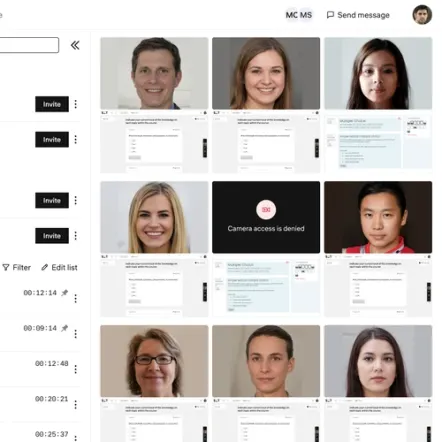
Honorlock's Live Pop-In model uses automated monitoring to bring potential concerns to a human proctor.
For either provider, ask the demonstrator to show a complete incident workflow. Who sees the alert? Who can communicate with the candidate? What happens if the event has an innocent explanation? Where can an authorized reviewer find the relevant recording and notes afterward?
An institution with experienced invigilators may want to keep these responsibilities inside its team. Another may need external staff for evening exams or candidates in different time zones. Compare staffing coverage with the actual examination calendar.
Evaluate carefully: a software feature described as “human review” does not, by itself, tell you who is employed to review a session or when the work happens. Put those responsibilities in the evaluation brief and contract.
Constructor lists Canvas, Moodle, Blackboard, and D2L Brightspace among its integrations. Honorlock also documents integrations with these learning systems.
The shared LMS names make a pilot more important. Use the quiz type, authentication method, accommodations, and result workflow your institution actually relies on. Ask an instructor to configure an exam, a candidate to complete it, and an administrator to retrieve the evidence.
Constructor's International Business School story describes a Moodle rollout with technical testing and a pilot module before wider adoption. That offers a useful implementation pattern, rather than a claim that every installation will take the same amount of time.
Constructor's Secure Browser page describes controls for the exam environment, including restricted applications and display checks. Honorlock documents BrowserGuard restrictions and a separate application for application control.
Request a supported-device matrix for the configuration you intend to buy. Then test it on representative institution-managed and personal devices. Include required software installation, permissions, approved resources, and the route for candidates who cannot use the standard setup.
A successful demonstration on one laptop does not establish coverage for the full candidate population. Record the operating system, browser, application version, and enabled settings for every pilot scenario.
Constructor describes volume-based pricing. Honorlock provides a pricing inquiry page for a tailored discussion. These sources do not establish a like-for-like total cost for your institution.
Request quotes for the same annual exam volume, duration, concurrency, and support hours. Include setup, internal proctor time, post-exam review, and any additional service. If one proposal includes external staff and another does not, show the difference explicitly in the cost model.
Three checks will turn the comparison into a decision.
Include Constructor Proctor in the final evaluation if you want configurable supervision connected to your assessment workflow, and if its available deployment fits your requirements. Validate the support and staffing arrangement before deciding.
Include Honorlock if its service options align with your operating model. Ask it to demonstrate the exact level of human involvement and any additional review service in the proposed package.
Track exam-start completion, candidate support needs, reviewer time, and whether staff can reconstruct an incident. Agree on acceptable outcomes before testing.
No. Honorlock also documents a Bring Your Own Proctor service. Compare the service you would purchase, rather than treating the vendor as having one fixed model. Source: Honorlock services.
No. Constructor Proctor can integrate with an existing LMS. Constructor Assess is another assessment-delivery option, rather than a prerequisite for every Proctor deployment. See Constructor Proctor.
That requires matched quotes and staffing assumptions. Compare the total cost of operating your exams, including the work your own team will perform.
See how Constructor Proctor compares with other proctoring providers, or review every option side by side on the comparison page.
Compare monitoring, review, LMS integration, and deployment.
Compare service levels, staffing, review timing, candidate setup, and cost.
Compare LockDown Browser, Monitor, and instructor live proctoring.
Compare human review, candidate setup, integration, and operating cost.
Explore Constructor Proctor with your LMS, candidate devices, and exam calendar. We can help define the configuration and pilot your team needs to evaluate.