Constructor Proctor vs Proctorio: compare the workflow behind the features
29 September, 2026


Constructor Proctor and Proctorio both offer configurable monitoring and ways for institutional staff to oversee exams. A useful comparison therefore goes beyond whether a product uses AI. It asks how candidates enter an exam, which controls are enabled, and how reviewers reach a decision.
Evaluate Constructor Proctor for a configurable proctoring workflow with an existing LMS or Constructor Assess. Evaluate Proctorio's current Integrity offering against the same requirements, including its staff-led live option. The right choice depends on the configuration your team can use consistently.
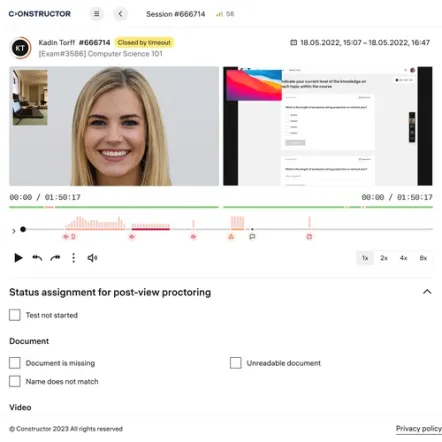
Constructor Proctor documents automated monitoring, post-exam review, and live oversight. Reviewed workflows use institution-designated reviewers.
Proctorio's Integrity page describes automated monitoring, asynchronous review, and Be Your Own Proctor for staff-led live supervision. A comparison that calls Proctorio automated-only would omit a documented option.
| Requirement | Constructor Proctor | Proctorio |
|---|---|---|
| Monitoring and review | Automated monitoring, post-exam review, and live modes | Automated monitoring, asynchronous review, and Be Your Own Proctor |
| Assessment integration | LMS connections, API, and Constructor Assess | LTI integrations and developer APIs |
| Common LMS examples | Canvas, Moodle, Blackboard, and D2L Brightspace | Canvas, Moodle, Blackboard, Brightspace, and Open LMS |
| Deployment discussion | Public page lists cloud, private cloud, and on-premises | Request the available architecture and hosting terms for your procurement requirements |
An open-book assessment, a closed-book entrance exam, and a professional certification may need different controls. Write a short policy for each before selecting the software configuration.
For example, an exam may permit a reference website but prohibit messaging. A candidate may need an approved break or assistive technology. Reviewers need to know what was authorized before interpreting an event as a possible violation.
For each provider, test the same allowed resources, prohibited actions, and candidate exceptions. Record whether the system blocks an action, creates a flag, or requires a reviewer to decide what happened. These are distinct behaviors and should not be combined into a single “security” score.
Constructor's Secure Browser documentation describes its exam-environment controls. Proctorio's Integrity page explains that institutions can configure blocking and monitoring.
An alert is useful when staff can understand the event in context. During a pilot, create a small set of approved test scenarios. Include an ordinary candidate movement, a permitted resource, and an action that breaks the written exam rules.
Have reviewers assess the resulting evidence without being told which platform should perform better. Measure the time needed to locate the relevant moment and record a reasoned conclusion. Ask whether another authorized reviewer can understand the decision later.
This exercise tests operational fit. It does not establish an overall accuracy rate, which would require a defined dataset and a much broader evaluation.
Both providers document common LMS integrations. The deciding detail may be your quiz engine, authentication, grade workflow, or how proctoring evidence is accessed.
Include LMS administrators and faculty in the pilot. Test the whole sequence from creating the exam to retrieving its review record. Ask what changes after an LMS upgrade and who handles support when the problem spans both products.
For a Constructor example, International Business School describes testing its Moodle integration before a pilot and wider rollout. The value of that example is the implementation process, not an assumption that every institution has the same requirements.
If your institution has a particular deployment requirement, provide it to both vendors before the demonstration. Specify where data must be processed, who needs access, what retention policy applies, and which documents procurement requires.
Constructor's public product page lists several deployment options. That makes deployment a relevant discussion point, but it does not establish that every option is available immediately in every market. Confirm the proposed architecture and delivery scope in writing.
Use the same evidence standard for Proctorio. An item not established by the sources reviewed here should be raised as a question, rather than converted into a negative feature claim.
Two checks will turn the comparison into a decision.
Constructor Proctor merits a pilot when your institution wants configurable oversight and integration with its assessment process. Proctorio merits a pilot when its monitoring, LMS integration, and staff-led supervision options fit the same requirements.
Ask both vendors to price the same exam volume, duration, concurrency, and implementation scope. Include the time your own team will spend configuring exams and reviewing incidents. Keep contracted support and staffing separate from software features.
No. Its current public documentation includes a Be Your Own Proctor option for staff-led real-time supervision. Source: Proctorio Integrity.
No. Several proctoring products support human involvement. Compare who reviews, when review happens, and what evidence the institution receives.
Both vendors document LMS integrations. Confirm support for your specific version and exam workflow with a pilot. Sources: Constructor Proctor, Proctorio integrations.
See how Constructor Proctor compares with other proctoring providers, or review every option side by side on the comparison page.
Compare oversight staffing, LMS integration, device requirements, and cost.
Compare service levels, staffing, review timing, candidate setup, and cost.
Compare LockDown Browser, Monitor, and instructor live proctoring.
Compare human review, candidate setup, integration, and operating cost.
Explore Constructor Proctor with the people who configure, supervise, and review your exams. Bring an actual assessment scenario so the demonstration answers your team's operating questions.