Constructor Proctor vs Respondus: compare the right exam setup
29 September, 2026


Constructor Proctor and Respondus should be compared at the configuration level. Respondus LockDown Browser, Respondus Monitor, and the Instructor Live Proctoring option perform different jobs. A browser restriction alone is a different purchasing scope from a browser combined with monitoring or live supervision.
Start with the assessment you need to deliver, the LMS you use, and the work your instructors can take on. Then compare the complete setup, including candidate devices, review responsibilities, support, and price.
Respondus LockDown Browser restricts the exam environment. Respondus Monitor adds automated monitoring and a review workflow. Respondus also documents an Instructor Live Proctoring option that uses a supported video-conferencing system alongside LockDown Browser; licensing and administrator enablement requirements apply.
Constructor describes automated monitoring, post-exam review, and live proctoring, with Secure Browser controls available for the exam environment. It supports LMS integration and use with Constructor Assess.
| Evaluation area | Constructor Proctor | Respondus |
|---|---|---|
| Restricting the exam environment | Secure Browser controls within the agreed configuration | LockDown Browser |
| Automated monitoring and review | Automated and reviewed modes; specify reviewer responsibilities | Respondus Monitor |
| Live supervision | Documented live proctoring mode | Instructor Live Proctoring option with its stated setup and licensing conditions |
| Assessment connection | Existing LMS or Constructor Assess | Confirm the supported LMS and configuration for the components being purchased |
| What to price | Monitoring mode, browser, implementation, staffing, and support | Required Respondus components, institutional licensing, setup, and staff effort |
The table describes published offerings. It does not establish that the products behave identically in a particular exam.
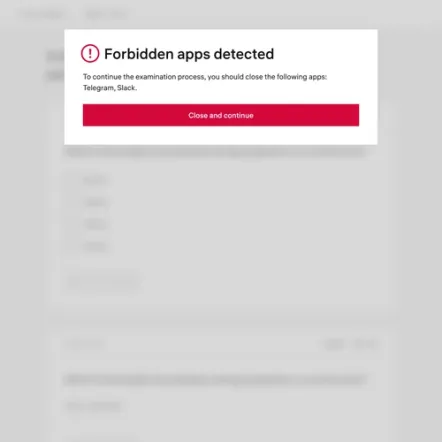
A secure-browser evaluation should start with the permitted exam environment. Can the candidate use a calculator, a reference site, a document, or specialist software? What should happen if another display or an unapproved application is detected?
Write these rules down before the demonstration. Ask each supplier to configure the same permitted resources and restrictions. Test both the intended exam path and the recovery process when a legitimate candidate is blocked.
Constructor's Secure Browser page describes application restrictions and checks involving displays and virtual environments. Respondus describes restrictions through LockDown Browser. Confirm the supported controls on each operating system in your own configuration.
Avoid treating a list of restrictions as proof that every form of misconduct is prevented. The practical question is whether your team can configure and operate the required exam policy consistently.
An asynchronous exam needs a different staffing plan from a scheduled seminar exam. An instructor who supervises a small live group may have different requirements from a team reviewing recordings across a large course.
Respondus presents Instructor Live Proctoring as an option for smaller classes using video conferencing. That should not be confused with the Respondus Monitor recording and review workflow.
For either supplier, establish when evidence becomes available and who reviews it. Test whether an instructor can find a relevant event, understand the context, record a decision, and manage an appeal. Include the review workload in your evaluation instead of measuring only how quickly candidates enter the exam.
An integration logo is a starting point. Your institution still needs to test its quiz type, authentication, permissions, approved accommodations, and route for returning results.
Constructor's International Business School implementation story describes Moodle testing and a pilot before wider rollout. A comparable pilot can help your institution test either supplier against its own workflow.
Respondus publishes specific system requirements and configuration restrictions, including conditions for tablet use. Check the current requirements for the chosen LMS and components.
Ask Constructor for the corresponding supported-device matrix for the proposed deployment. Test assistive technology, institution-managed laptops, personal devices, and the alternative route for candidates who cannot use the standard configuration. Do not assume that support for an operating system means support for every exam setup on that operating system.
Build one annual cost model using the same candidate count, exam volume, and calendar. For Respondus, identify the components required for the workflow being evaluated. For Constructor, specify the monitoring mode, browser configuration, deployment, implementation, and any partner staffing.
Add internal instructor and administrator time. Include candidate support, mock exams, configuration, review, and exceptional cases. A license price does not capture all of the work required to deliver an assessment program.
Ask both suppliers for written commercial terms. Avoid treating an advertised entry price or an unrelated institution's contract as a like-for-like quote for your program.
Two checks will turn the comparison into a decision.
Evaluate Constructor Proctor when its oversight modes, integration choices, or deployment options fit your program. Evaluate Respondus when its browser and monitoring components fit your LMS and teaching workflow. In both cases, establish who will operate the system and support candidates.
Run the same representative exam, record successful starts and support needs, and ask instructors to complete a review task. Choose the setup your institution can configure, explain, and sustain.
No. LockDown Browser restricts the exam environment; Monitor adds monitoring and review capabilities. Identify both components when defining the comparison. Source: Respondus product information.
Yes. Its documented Instructor Live Proctoring option has specific licensing, setup, and video-conferencing requirements. It should be evaluated separately from the Monitor workflow. Source: Instructor Live Proctoring.
No. Constructor documents integration with existing learning systems. Constructor Assess is an additional assessment-delivery option. Source: Constructor Proctor.
See how Constructor Proctor compares with other proctoring providers, or review every option side by side on the comparison page.
Compare oversight staffing, LMS integration, device requirements, and cost.
Compare monitoring, review, LMS integration, and deployment.
Compare service levels, staffing, review timing, candidate setup, and cost.
Compare human review, candidate setup, integration, and operating cost.
Explore Constructor Proctor using your LMS, device requirements, and assessment policy. A pilot can establish the configuration and staff responsibilities before a broader rollout.